
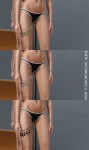
–>>Download<<–
Create by Gunji_pool
MESH: Includ
Thanks Ven Nesh for model




New conversion. For female.
–>>Download<<–
Create by: Gunji_pool
MESH: Include


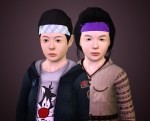
Headband [Accessories]
For Child to Elder, Male and Female.
1 recolourable channel, 4 presets. With custom thumbnails.Known Issues: Because this is accessory, not hair, so the hair will penetrate from headband. Some hairstyles may look suitable with this headband, some hairstyles do not.
Hair Credits: Female Adult by @cazysims Female Child by @newseasims Male Adult & Child : EA
DOWNLOAD ON MY BLOG

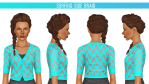
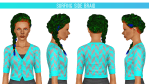
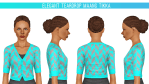
First up is a hair from the new store set called Surfing Side Braid. It is a hat hair because it has a tiny rubber band at the end of the braid. Both hairs are .package format only because I couldn’t get them to work with TSRW.
- For teen–elder females
- Polycount: 4166 faces, 3747 vertices
- Format: .package
- Won’t conflict with other versions
- Credit to EA for the mesh and textures
★ DOWNLOAD
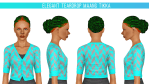
The second hair is a cute bun from the India Inspirations set called Elegant Teardrop Maang Tikka. I de-accessorized it and it’s categorized as a regular hair.
- For teen–elder females
- Polycount: 3020 faces, 2521 vertices
- Format: .package
- Won’t conflict with other versions
- Credit to EA for the mesh and textures
★ DOWNLOAD
Mirror: Skydrive
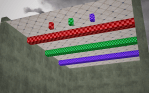
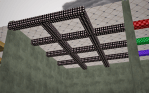
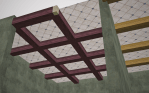
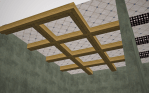
[Sims 3] Mspoodle Ceiling Beam Stuff
- Includes Ceiling Fence with ends, no ends, and a corner piece (column).
- All are sim routable.
- Is set to be visible below the floor tile (so it’s floor tile height not wall height – see the 1st picture – you can see the wall height is higher than the floor tile).
- The top faces of the beams have been removed for visibility from above.
- 3 presets with 3 pattern tile ratios – 2×2, 3×3, 4×4
- Thank you too @potato-ballad-sims for the request.
- We did play around with the footprint and bounding boxes trying to be able to drag the fence over existing builds/objects but I couldn’t find a solution that worked. You’ll have to move everything, then place it. Hope that makes sense. Anyways…..lol!
- Happy Building! 🙂
Links
*Files added to my previous Fence Set*

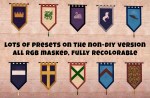
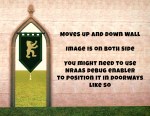
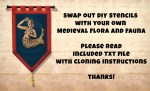
DIY Medieval Banners, after Luna
You all know the Luna I mean. The one with hands-down the most fantastical otherworldly and romantical historical cc that you ever did see.
Well, @tyrellsimsoficeandfire and I had the same thought that it would be GREAT if they could be customized with heraldry. The problem is Luna’s meshes made that pretty difficult.So, here for you today is a completely re-meshed and re-textured banner, in the same dimensions and overall appearance of Luna’s original banners (otherwise known as “tapiz 2 and tapiz 4”).
download here (always adfly-free!):
mirror: https://www.mediafire.com/file/x28ry72qev664hs/ami_medievalbanners.zip
Find in the download:
A small and large version with multiple presets with RGB mask heraldic imagery.
A small and large DIY version with 7 overlay slots. I did NOT make useful overlays here. This is PURELY for DIY purposes. I may release a version with overlays soon, but for now, these two are DIY only.
Also included: all 4 TSRW projects and a text file with instructions for cloning and changing out the overlays. I also briefly explain how to do this with Texture Tweaker, but be warned, if you clone using S3OC and use Texture Tweaker on it, you will likely get warnings to say it doesn’t work. You can (I believe) safely ignore those messages and the files still should work fine and you should still be able to change the presets with Texture Tweaker. If anyone knows differently, please let me know!
I would be THRILLED if you share your custom versions of this. Tag me and I’ll reblog! But PLEASE be sure to clone the item so that it has a different OBJD number, so that it won’t conflict with other people’s projects, or mine! Thanks!


 Greco Roman Sims 3 Poetry